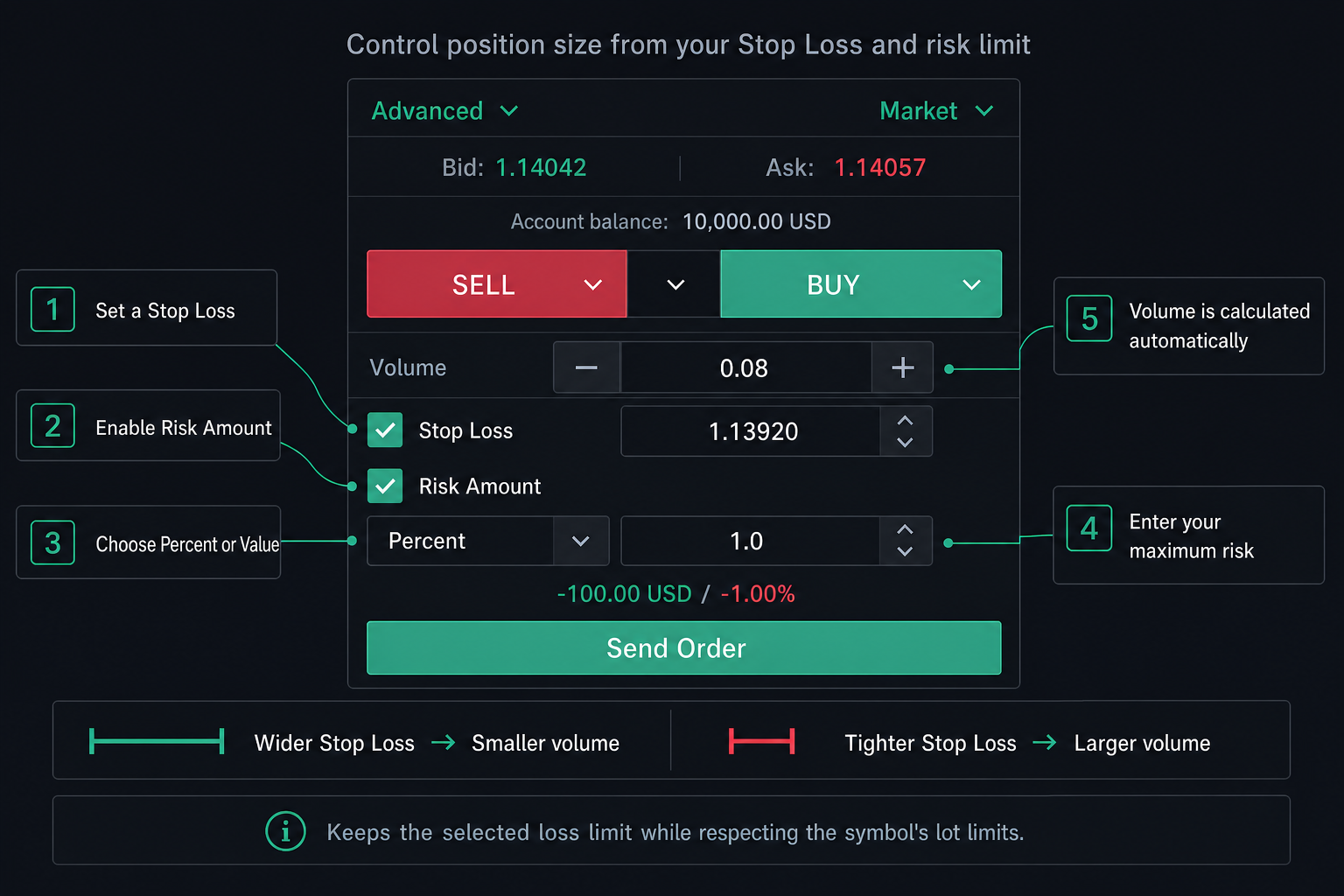
A trade idea can look simple until you need to decide how large the order should be. Risk Amount starts with a more useful question than “how many lots should I trade?”: “how much of my account Balance am I prepared to risk if this idea reaches my Stop Loss?”
Risk Amount in plain language
Risk Amount is a position-sizing tool in the Advanced order section. It uses your Stop Loss distance and a risk amount that you enter as either a percentage or a fixed value to calculate an estimated Volume. It supports market and pending orders. Instead of choosing a fixed lot size first, you define the amount you want to risk, then review the calculated volume before you submit the order.
Before you begin
- Open the order panel and switch on Advanced. Risk Amount is part of the Advanced ticket.
- Tick Stop Loss and set a valid SL price, either in the ticket or by dragging the SL line on the chart. Risk Amount needs a Stop Loss: ticking Risk Amount also ticks Stop Loss, and unticking Stop Loss turns Risk Amount off.
- Keep Risk Amount ticked. It turns on automatically when you tick Stop Loss, but you can untick it to set Volume yourself.
- Make sure the platform has the required symbol specification, entry price, account Balance, and currency conversion data to complete the calculation.
Choose Percent or Value
In Percent mode, enter the percentage of the account Balance you want to risk. Floating profit or loss does not change this calculation base: Risk value = Risk percent / 100 × Account Balance. For example, 2% on a 10,000 USD Balance produces a target risk value of 200 USD. In Value mode, enter a fixed amount in the account currency; for example, 200 means 200 USD for a USD account or 200 EUR for a EUR account. Percent starts at 1 and its + / − buttons move in steps of 0.5; Value starts at 1% of your Balance and moves in steps of 0.1.
How to use the calculated result
- Choose Percent or Value, then enter an amount greater than zero.
- For a BUY order, Stop Loss must be below the applicable entry price. For a SELL order, Stop Loss must be above it.
- Review the automatically calculated Volume and the estimated loss shown below the inputs before placing the order.
- Choose your Take Profit separately. Risk Amount does not set it or predict where the market will move.
Why changing Stop Loss changes Volume
The calculation uses the applicable entry price for the order type and the distance between that price and Stop Loss. For the same risk value, moving Stop Loss farther from the entry generally reduces calculated Volume; moving it closer generally increases calculated Volume. A simplified version of the calculation is Raw volume = Risk value in profit currency / (SL price distance × Contract size). The platform then rounds Volume down to the valid trading step and applies the symbol’s minimum and maximum volume limits.
Important checks before placing an order
- If SL direction is invalid or its distance is zero, the platform cannot calculate a new Volume. A previously displayed Volume may remain visible, so correct SL and confirm that both Volume and estimated loss update.
- If Volume is raised to the symbol minimum, the estimated loss may be higher than the risk value you selected. The ticket then shows an amber warning, for example “Minimum volume 0.01 risks 19.95 USD (0.20%), more than the 10.00 USD you set.” Move Stop Loss closer, or reconsider the trade, if that loss is more than you accept.
- If your Auto SL/TP Guard rule has Size lot from stop loss turned on, market orders hide Risk Amount: the Guard rule then sizes the lot from your Stop Loss and sets Take Profit from its Default TP.
- Currency conversion, spread, slippage, volume rounding, commissions, swap, fees, gaps, and fast market conditions can cause displayed or final loss to differ from the selected risk.
- Review the final Volume, Stop Loss, estimated loss, margin requirements, and all instrument-specific conditions before submitting an order.
- Use a demo account to practise the workflow before relying on it in a live environment.
Risk Amount is a planning aid, not a guarantee. It does not create a separate risk rule, and market conditions can cause the final loss of an executed trade to differ from the estimate. Always review the final order details and applicable terms before trading. Trading involves risk and losses can occur.